
Click-to-WhatsApp (CTWA) Ads: Campaign Setup, 72-Hour Free Window & ROI Strategy
According to paid advertising benchmarks (WordStream & Meta Ads reports), standard web landing pages and lead forms suffer from 30%–40% lead contact rates due to fake numbers and delayed follow-ups. Click-to-WhatsApp (CTWA) ads eliminate this friction by opening a direct chat with verified buyers—while Meta waives all conversation messaging fees for a full 72 hours. Here is the complete 2026 playbook to scale profitable customer acquisition.
Key Takeaways for Growth Marketers
- Zero Meta message fees for 3 days: When a user clicks a CTWA ad, Meta starts a 72-hour free messaging window. You pay ad spend to Meta Ads Manager, but zero per-message charges on WhatsApp during that window.
- Immediate 100% verified lead capture: No fake email addresses or mistyped phone numbers. When the customer taps “Send”, you receive their verified WhatsApp number and profile name immediately.
- Speed-to-lead closes deals: Responding in under 60 seconds increases conversion rates by up to 391% (Velocify / Lead Response Management study). Automated greeting flows qualify prospects before handing off to live sales reps in GrowOnBot's Shared Team Inbox.
- Native Catalog Integration: Showcase in-chat product collections using your WhatsApp Catalog so buyers can browse and checkout without ever leaving the conversation.
1. What Are Click-to-WhatsApp (CTWA) Ads?
Click-to-WhatsApp (CTWA) ads run across Facebook News Feed, Instagram Stories, Reels, and Explore. Instead of directing prospects to an external landing page with high bounce rates, clicking the ad instantly launches WhatsApp with a pre-filled message prompt.
Traditional Web Lead Forms
- • Prospect leaves social app → slow landing page load
- • Manual form fields cause 60%–70% drop-off
- • Frequent fake phone numbers and throwaway emails
- • Contact rate on outbound calls: only 30%–40%
- • Days spent playing phone tag and waiting for email opens
Click-to-WhatsApp Ads
- • Zero page load friction → WhatsApp opens in 1 second
- • 1-tap pre-filled icebreaker prompts require no typing
- • 100% verified real phone number captured automatically
- • Contact rate inside WhatsApp: over 90%
- • Instant 2-way conversation qualifies and closes in real time
• Lead Form Contact Rates (30%–40% vs >90% on WhatsApp): Data synthesized from B2B and D2C paid acquisition benchmarks published by WordStream, HubSpot, and Meta Ads performance studies.
• Speed-to-Lead Conversions (up to 391% boost): Velocify / Lead Response Management research benchmarking sub-minute response time vs 30+ minute follow-ups.
• 72-Hour Free Window Policy: Official Meta WhatsApp Business Platform pricing documentation regarding Ads that Click to WhatsApp and Facebook Page CTAs.
• *Observed Metrics: Lead qualification speed and conversion rates represent typical observed ranges across mid-market e-commerce, real estate, and professional service campaigns utilizing conversational lead routing.
2. The Game-Changer: Meta's 72-Hour Free Messaging Window
To encourage businesses to adopt conversational commerce, Meta offers an exceptional pricing incentive for ads that click to WhatsApp:
Official Meta Policy: 72 Hours of Free Conversations
When a user sends a message from a Click-to-WhatsApp ad, a 72-hour free window opens immediately. During these 3 days, Meta charges ₹0.00 / $0.00 / AED 0.00 for any messages exchanged between the business and the user—including free-form text, product catalog messages, images, PDFs, and follow-up templates.
How the Window Triggers
The timer begins the moment the customer sends their first message from the ad. It applies to both new prospects and existing contacts who click your ad.
Unlimited Follow-Ups During the Window
You can send multiple follow-ups, product brochures, quotes, and customer reviews across the 72 hours without paying Meta per-conversation or per-message fees.
After the 72-Hour Window Closes
If you re-engage the customer after 72 hours of inactivity, standard Meta template message pricing applies. On GrowOnBot, you pay Meta's raw rate cards with 0% platform markup. Review our WhatsApp Business API Pricing Guide.
3. Step-by-Step Setup in Meta Ads Manager (2026)
Follow this step-by-step workflow to connect your WhatsApp Business API number to Meta Ads Manager:
Select the Right Campaign Objective
In Meta Ads Manager, click Create and choose Engagement or Leads. Under Conversion Location, select Messaging Apps and uncheck Messenger/Instagram Direct so traffic routes exclusively to WhatsApp.
Connect Your Official WhatsApp API Number
Select your connected Facebook Page and verify that your official WhatsApp Business number (managed via GrowOnBot) is selected. This ensures that incoming chats trigger your GrowOnBot automations.
Configure Pre-Filled Message Prompts
At the Ad Creative level, configure an enticing Message Template. Use clear, low-friction pre-filled text like “Hi! I saw your ad for {{1}} and would like more details” so the user can send the initial prompt with a single tap.
4. 4 Battle-Tested CTWA Greeting & Qualification Flows
The secret to high ROI on CTWA ads is pairing the ad click with an automated conversational bot that responds instantly and qualifies intent:
Instant Catalog & Coupon Delivery
Here is the product catalog you requested. Plus, take an extra 10% off with code *WELCOME10*:
Property Brochure & Site Tour
I have attached the floor plans and pricing PDF below. Would you like to schedule a VIP site visit this weekend?
Automated Lead Qualification
To connect you with the right specialist, what is your current monthly ad spend?
Instant Booking Consultation
Our clinic is located in {{2}}. Which day works best for your appointment?
5. The ROI Math: CTWA vs Traditional Lead Form Ads
Marketers often compare cost-per-click, but the real metric that dictates profitability is Cost Per Contacted, Qualified Lead:
Illustrative Economic Model: $2,000 Ad Spend Comparison
Compare a traditional Facebook Lead Form campaign versus a Click-to-WhatsApp campaign with an identical $2,000 media budget:
Traditional Web Lead Form Campaign
- • Ad spend: $2,000
- • Cost per form submission: $20
- • Total leads generated: 100 leads
- • Contact rate (outbound calls/emails): ~35%
- • Actual prospects reached: 35 leads
- • True Cost Per Contacted Lead: $57.14
Click-to-WhatsApp (GrowOnBot)
- • Ad spend: $2,000
- • Cost per conversation started: $16
- • WhatsApp conversations initiated: 125 chats
- • Contact rate: ~92% (live in chat)
- • Actual prospects reached: 115 leads
- • Meta messaging cost during 72-hr window: $0.00
- • True Cost Per Contacted Lead: $17.39 (70% Lower CPL)
6. How GrowOnBot Powers High-Converting CTWA Campaigns
Running CTWA ads on a single personal phone number results in missed messages and frustrated leads. GrowOnBot gives you enterprise-grade conversational infrastructure:
Sub-10 Second Automated Response
When a prospect clicks your ad at 11 PM or during peak rush, GrowOnBot's bot greets them immediately, answers FAQs, and captures key requirements.
Multi-Agent Shared Team Inbox
Once the lead is qualified, the conversation is automatically assigned to available sales reps inside our Multi-Agent Shared Team Inbox. Reps can collaborate with internal notes, send product links, and track performance.
0% Markup on Post-72-Hour Nurturing
For leads that require long sales cycles, re-engage them later with approved template broadcasts at Meta's raw rate cards with zero reseller markup.
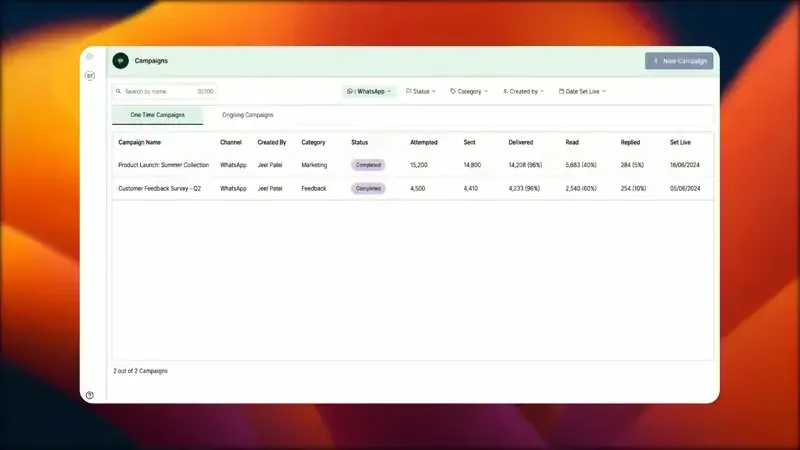
GrowOnBot Campaigns & Broadcasts: manage inbound lead flows, customer segments, and multi-agent conversations.
Frequently Asked Questions: Click-to-WhatsApp Ads
Meta Ads & AEOAnswers to common strategic and technical questions about scaling CTWA campaigns.
Explore Related WhatsApp Business Guides
Master conversational commerce, customer acquisition, and marketing operations:
Official Meta rate cards, per-message rates in INR/AED/USD, and zero-markup platform economics.
Multi-agent chat routing, response tracking, and team collaboration on a single WhatsApp number.
Recover 15%–35% of lost checkouts (typical multi-step workflow benchmark) using a high-converting 3-step sequence and copy-paste templates.
Protect your phone number's Quality Rating, messaging tiers, and opt-in compliance best practices.
Ready to Turn Social Ad Clicks into WhatsApp Sales?
Start your 14-day free trial on GrowOnBot today. Connect your Meta Ads Manager, capture verified leads in real time, and take full advantage of Meta's 72-hour free messaging window.