10 min readCampaigns & Sales

According to paid advertising benchmarks (WordStream & Meta Ads reports), standard web landing pages and lead forms suffer from 30%–40% lead contact rates due to fake numbers and delayed follow-ups. Click-to-WhatsApp (CTWA) ads eliminate this friction by opening a direct chat with verified buyers—while Meta does not charge for your messages inside the free entry point window, which can stay open up to 7 days. Here is the complete 2026 playbook to scale profitable customer acquisition.
Click-to-WhatsApp (CTWA) ads run across Facebook News Feed, Instagram Stories, Reels, and Explore. Instead of directing prospects to an external landing page with high bounce rates, clicking the ad instantly launches WhatsApp with a pre-filled message prompt.
• Lead Form Contact Rates (30%–40% vs >90% on WhatsApp): Data synthesized from B2B and D2C paid acquisition benchmarks published by WordStream, HubSpot, and Meta Ads performance studies.
• Speed-to-Lead Conversions (up to 391% boost): Velocify / Lead Response Management research benchmarking sub-minute response time vs 30+ minute follow-ups.
• Free Entry Point Window Policy: Official Meta WhatsApp Business Platform pricing documentation regarding Ads that Click to WhatsApp and Facebook Page CTAs.
• *Observed Metrics: Lead qualification speed and conversion rates represent typical observed ranges across mid-market e-commerce, real estate, and professional service campaigns utilizing conversational lead routing.
To encourage businesses to adopt conversational commerce, Meta offers an exceptional pricing incentive for ads that click to WhatsApp:
When a user sends a message from a Click-to-WhatsApp ad, a free entry point window opens once you respond, and can stay open up to 7 days. While it is open, Meta charges ₹0.00 / $0.00 / AED 0.00 for the marketing, utility, authentication and service messages you send in that window, including free-form text, product catalog messages, images, PDFs, and follow-up templates. Customer messages to you are always free. Source: Meta's WhatsApp pricing documentation.
The timer begins the moment the customer sends their first message from the ad. It applies to both new prospects and existing contacts who click your ad.
You can send multiple follow-ups, product brochures, quotes, and customer reviews across the window without paying Meta per-conversation or per-message fees.
If you re-engage the customer after the free entry point window closes, standard Meta template message pricing applies. On GrowOnBot, you pay Meta's raw rate cards with 0% platform markup. Review our WhatsApp Business API Pricing Guide.
Follow this step-by-step workflow to connect your WhatsApp Business API number to Meta Ads Manager:
In Meta Ads Manager, click Create and choose Engagement or Leads. Under Conversion Location, select Messaging Apps and uncheck Messenger/Instagram Direct so traffic routes exclusively to WhatsApp.
Select your connected Facebook Page and verify that your official WhatsApp Business number (managed via GrowOnBot) is selected. This ensures that incoming chats trigger your GrowOnBot automations.
At the Ad Creative level, configure an enticing Message Template. Use clear, low-friction pre-filled text like “Hi! I saw your ad for {{1}} and would like more details” so the user can send the initial prompt with a single tap. You can test and refine prefilled greeting copy before launching paid campaigns using our free WhatsApp Link Generator.
The secret to high ROI on CTWA ads is pairing the ad click with an automated conversational bot that responds instantly and qualifies intent:
Marketers often compare cost-per-click, but the real metric that dictates profitability is Cost Per Contacted, Qualified Lead:
Compare a traditional Facebook Lead Form campaign versus a Click-to-WhatsApp campaign with an identical $2,000 media budget:
Running CTWA ads on a single personal phone number results in missed messages and frustrated leads. GrowOnBot gives you enterprise-grade conversational infrastructure:
When a prospect clicks your ad at 11 PM or during peak rush, GrowOnBot's bot greets them immediately, answers FAQs, and captures key requirements.
Once the lead is qualified, the conversation is automatically assigned to available sales reps inside our Multi-Agent Shared Team Inbox. Reps can collaborate with internal notes, send product links, and track performance.
For leads that require long sales cycles, re-engage them later with approved template broadcasts at Meta's raw rate cards with zero reseller markup.
Convert paid ad traffic alongside website visitors by installing our free WhatsApp Chat Widget on your high-traffic landing pages. Browse both free tools on our free WhatsApp tools hub.
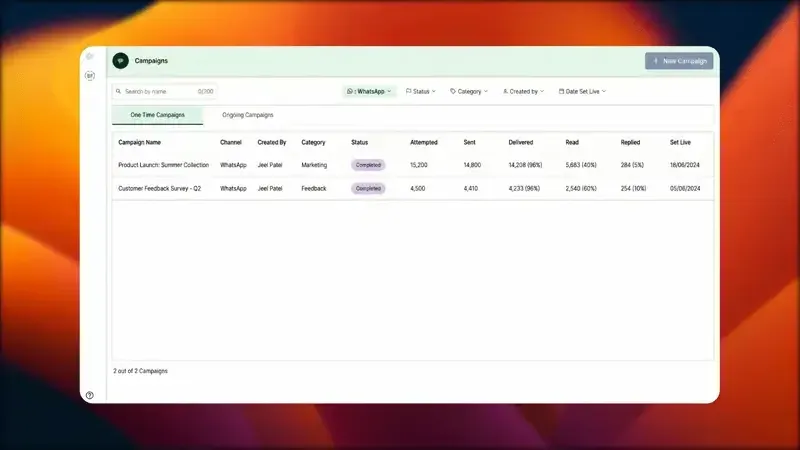
GrowOnBot Campaigns & Broadcasts: manage inbound lead flows, customer segments, and multi-agent conversations.
Answers to common strategic and technical questions about scaling CTWA campaigns.
Meta's pricing changed on October 1, 2026: service messages are charged from October 2026, with 1,000 free per business phone number each month.
Master WhatsApp marketing, customer support, and sales automation with our comprehensive guides:
Start your 14-day free trial on GrowOnBot today. Connect your Meta Ads Manager, capture verified leads in real time, and take full advantage of Meta's free entry point messaging window.