7 min readSetup & Compliance

A WhatsApp shared team inbox lets several agents reply from one business number, each with their own login, with chats assigned automatically and nobody talking over a colleague. This guide covers why the free app breaks down for teams, the routing rules that matter, collision detection, internal notes, CRM contact sync and what it costs.
The WhatsApp Business app supports one primary phone plus a small number of linked companion devices. Everyone who is linked shares the same login and the same inbox. That works for a founder answering a few chats and fails quickly once a real team is involved.
For the full comparison, see WhatsApp Business API vs the free Business app.
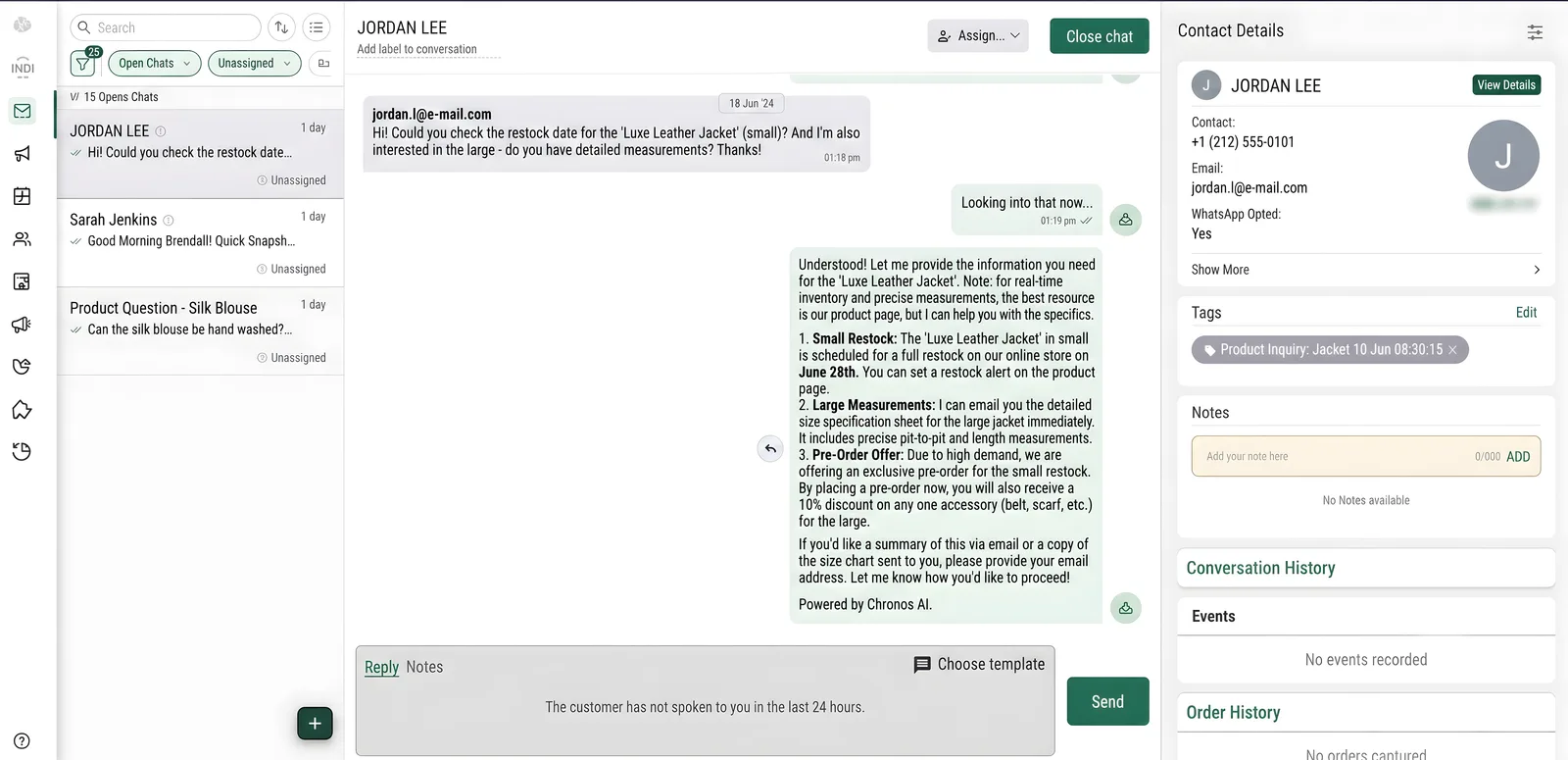
On the WhatsApp Business Platform, your number is connected to Meta's cloud-hosted API instead of to a phone. A shared team inbox is the web app that sits on top of it. Customers still message one number. Behind it, any number of agents sign in with their own credentials and work the same queue at the same time.
New chats go to an available agent automatically instead of landing in one unsorted feed.
Each agent has an individual account, so every reply is attributable and access can be revoked instantly.
First-response time, resolution time and volume per agent, instead of guesswork.
Routing decides who gets the next conversation. The three approaches you will weigh:
| Rule | How it works | Best for |
|---|---|---|
| Round robin | New chats rotate through available agents in turn. | Sales teams that want fair lead distribution. |
| Workload / capacity | The next chat goes to the agent with the fewest open conversations. | Support desks with uneven chat lengths. |
| Rule-based (language, topic) | Chats are matched to the agents who handle that language or topic, such as billing versus new sales enquiries. | Mixed teams in India and the UAE handling several languages. |
Whichever rule you start with, agents and managers can also assign or transfer a chat manually when a conversation needs a specialist.
Collision detection shows when another agent is already working in a conversation, so two replies don't go out at once. Internal notes let teammates leave context on the chat thread, for example “refund approved, send the confirmation”, without the customer ever seeing it. Together they make handoffs between shifts and between agents clean.
Recurring questions such as delivery timelines, pricing and opening hours can be answered with saved replies, and agents can send brochures, invoices and catalog items from the same window. Outside the 24-hour customer-service window, a reply has to go out as an approved template; see WhatsApp template message rules.
A shared inbox is most useful when the person on the other end already exists in your CRM. GrowOnBot connects to HubSpot, Zoho CRM (Professional plan or higher) and Salesforce. When a new WhatsApp contact messages in, a contact or lead record can be created or updated, and CRM record changes can trigger template messages. Google Sheets works too: a new or updated row can trigger a message, which suits teams that track leads in a spreadsheet.
Setup details are in the WhatsApp CRM integration guide.
A shared inbox makes response speed measurable. The numbers worth watching:
Shared inbox pricing usually has two parts: what the platform charges you, and what Meta charges per message. Some providers add a markup on top of Meta's per-message rate, which grows with your volume, so compare that line as well as the seat price.
GrowOnBot's Launch and Growth plans include the multi-agent shared inbox and charge 0% markup on Meta's per-message rates. Billing is in INR, AED or USD.
UAE accounts billed in AED pay a ~4% currency conversion fee on Meta message charges. This is a payment-conversion cost, not a markup.
Make sure the contacts you message have opted in. The rules are in WhatsApp opt-in rules and best practices. To hand over from a bot to a person, see WhatsApp chatbot for customer support.
GrowOnBot's Launch and Growth plans include a multi-agent shared inbox, broadcasts, and catalogs at zero markup on Meta's message rate. Ready to try it? Start a 14-day free trial.
To start feeding high-intent conversations directly into your shared team inbox, embed our free WhatsApp Chat Widget on your website, or use our free WhatsApp Link Generator to create direct department chat links for sales and support routing.
Meta's pricing changed on October 1, 2026: service messages are charged from October 2026, with 1,000 free per business phone number each month.
Master WhatsApp marketing, customer support, and sales automation with our comprehensive guides: