22 min readCampaigns & Sales

WhatsApp abandoned cart recovery sends an automated, opted-in message to a shopper who started checkout and left. According to the Baymard Institute, which has synthesised 49 cart abandonment studies, the average documented abandonment rate is 70.19%. This guide covers the Shopify triggers, a 3-step sequence, Meta compliance rules, how to stop messages the moment someone buys, and an illustrative ROI model.
Baymard's research puts the average abandonment rate at 70.19%, which means about 7 of every 10 shoppers who add to cart leave without paying. Reasons include unexpected costs, a long checkout, payment problems and simply being interrupted.
Email reminders still have a place, but they depend on the shopper opening an inbox, and they can sit unread in a promotions folder for hours. WhatsApp messages arrive in the app people already check all day, with a product reference and a button back to checkout. You can run both: WhatsApp for the fast reminder, email as a backup for shoppers who did not give consent to WhatsApp.
Source: Baymard Institute, cart abandonment rate statistics (average across 49 studies). We do not quote a recovery rate for WhatsApp here because results depend heavily on store, product and timing. Measure your own.
GrowOnBot connects to your Shopify store and listens for store events. The ones relevant to recovery and what follows:
| Shopify event | What it does in your recovery flow |
|---|---|
| Abandoned cart | Starts the recovery sequence for shoppers who gave a phone number and WhatsApp consent. |
| Order placed | Ends the sequence at once, so no further reminders are sent. |
| COD placed | Moves the shopper to your COD confirmation flow instead of recovery. |
| Shipped, out for delivery, delivered, cancelled | Post-purchase updates, sent as Utility templates. |
Using a custom storefront rather than Shopify? Contact GrowOnBot to discuss your setup. For the wider Shopify setup, see the Shopify WhatsApp marketing guide.
A cart reminder with an item name, checkout link or discount is promotional, so it is a Marketing template and cannot be submitted as Utility. See the template message rules.
Collect consent at checkout with a clearly labelled checkbox, for example “Send me order updates and checkout reminders on WhatsApp.” See opt-in rules and best practices.
Include a quick-reply such as “Stop updates” and honour it straight away. Opt-outs protect your quality rating; ignoring them gets you reported. See broadcast ban prevention.
Reminding someone who has already paid is the quickest way to earn a spam report. The order-placed event must cancel any scheduled message.
Space the messages out and escalate gently. The timings below are recommended starting points to test, not fixed rules. Cap it at three messages per shopper.
Many shoppers were interrupted or hit a glitch. Remove friction and offer help; no discount yet.
If they're still hesitating, it's usually doubt: quality, returns, delivery time. Answer it with your real policies. Use only claims you can back up.
Variable {{3}} is your own return, exchange or delivery policy line.
Price may be the last obstacle. If you offer an incentive such as a coupon or free shipping, make it real and time-limited, and keep it for this last message so you do not discount every sale.
Each template has to be approved by Meta before it can be used. Submit your wording through your GrowOnBot dashboard or WhatsApp Manager and allow time for review.
Cart recovery sends several messages per shopper, so per-message cost matters. The model below uses a Meta rate and a store you can swap for your own numbers.
Assumptions: India Marketing rate of about ₹0.78 per message, 1,000 abandoned carts a month, up to 3 messages each (3,000 messages), average order value ₹2,500.
| Scenario | Message cost for 3,000 messages |
|---|---|
| At Meta's rate (GrowOnBot, 0% markup) | ₹2,340 |
| Hypothetical provider adding a 25% per-message markup | ₹2,925 (₹585 extra) |
| Same hypothetical markup at 50,000 messages a month | ₹9,750 extra (₹39,000 at Meta's rate) |
Break-even: at ₹2,500 per order, one recovered order covers the ₹2,340 message bill in this model. Anything above that depends on your own recovery rate, which we don't assume.
For the full rate breakdown for India, the UAE and global markets, read the WhatsApp Business API pricing guide.
Shoppers often reply to a reminder with a question: sizing, delivery, whether COD is available. Those replies land in GrowOnBot's shared team inbox, where an agent can answer from the same number and close the sale while intent is still high.
You can also place the free WhatsApp Chat Widget on product and checkout pages to answer questions before the shopper leaves, and use the WhatsApp Link Generator for prefilled “I need help with my order” links in email receipts.
A WhatsApp Business Platform number, a verified Meta Business Manager, and Marketing templates submitted for approval.
Link your store in the GrowOnBot dashboard so abandoned cart and order events reach your workflow.
Put a WhatsApp opt-in checkbox beside the phone field and store the consent.
Start with the 30–45 minute, 4–6 hour and 20–24 hour spacing and no more than 3 messages per shopper.
Place a test order mid-sequence and confirm no further message arrives.
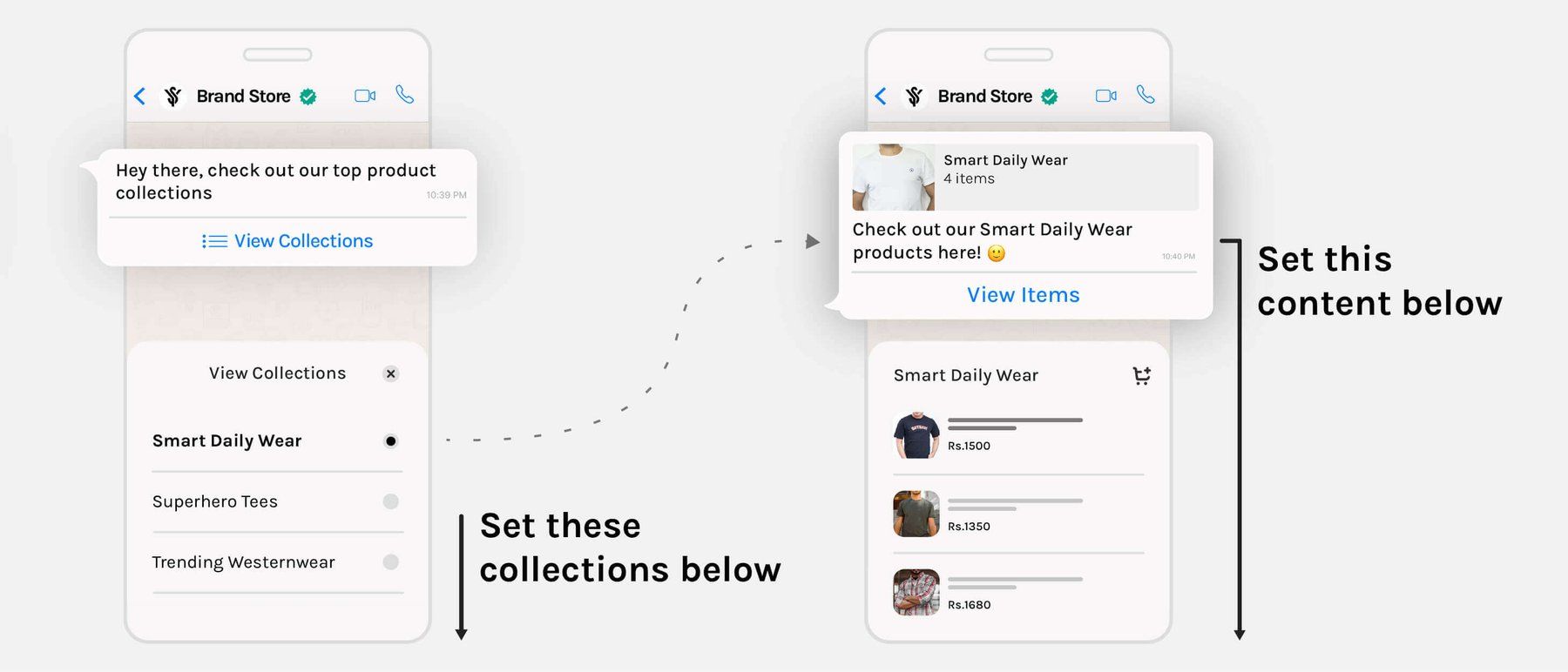
WhatsApp catalog showcase: interactive product cards and direct checkout links. See the WhatsApp catalog guide.
Master WhatsApp marketing, customer support, and sales automation with our comprehensive guides:
Start your 14-day free trial on GrowOnBot. Meta's message rates are passed through with zero markup.