
14 min readCampaigns & Sales
Shopify WhatsApp Marketing: The Complete High-ROI Automation Guide (2026)
By Jeel Patel16 min readCampaigns & Sales
Over 75% of Shopify storefront traffic now originates on mobile devices, yet standard mobile checkout abandonment rates remain punishingly high at 70.19% (Baymard Institute). While traditional email recovery workflows struggle with 20% open rates and SMS gets lost in carrier spam filters, WhatsApp automation connects directly with shoppers inside their most active app. Here is how modern D2C brands turn WhatsApp into their #1 revenue engine.
70.19%
Avg Cart Abandonment (Baymard)
15%–25%
Recovered Cart Rate*
-50%
COD RTO Reduction*
0%
GrowOnBot Message Markup
Executive Summary for Shopify Merchants
- Mobile-first capture beats desktop popups: Replace invasive email modals with lightweight floating WhatsApp chat buttons and 1-tap wa.me links that capture verified customer phone numbers instantly.
- Automate high-intent touchpoints: Deploy the 4 foundational flows: Abandoned Cart Recovery (recovering up to 25% of lost checkouts), Order Confirmation with Live Tracking, 1-tap COD Verification, and Post-Purchase Review Collection.
- Slash logistics bleed: Cash-on-Delivery (COD) orders without verification incur devastating courier RTO penalties. Automated WhatsApp verification filters out impulse and fake orders before dispatch.
- Avoid reseller markups: Standard Shopify app store solutions charge hidden 20%–50% surcharges on Meta message costs. GrowOnBot provides the official WhatsApp Business API with 0% platform markup.
The Mobile Commerce Challenge on Shopify: Why Email Popups Fail
The modern e-commerce buying journey has shifted decisively to smartphones. According to the Shopify Commerce Trends Report, over 75% of customer traffic and more than 65% of orders on Shopify stores happen on mobile browsers.
Despite this mobile dominance, most merchants still rely on desktop-era conversion tactics: full-screen modal email popups that interrupt browsing, trigger accidental closes, and result in 90%+ bounce rates. When shoppers do abandon checkout, recovery emails land in Gmail's Promotions folder hours after the buyer has moved on.
The Traditional Funnel Friction
- • Intrusive email modal popups that ruin mobile UX
- • Fake or mistyped email addresses during lead capture
- • 18%–22% open rates on cart recovery emails
- • 24–48 hour response delays on pre-purchase product questions
The WhatsApp Conversational Advantage
- • Non-intrusive floating chat widget with 1-tap connection
- • 100% verified mobile phone numbers and real names captured
- • 98% open rates and 45%–60% click-through rates
- • Sub-2 minute automated response times for buyer inquiries
By adding a WhatsApp website chat button directly to your Shopify storefront, you give mobile visitors an instant, friction-free bridge to ask questions about sizing, delivery times, or discounts before they abandon their cart.
4 Essential Automated WhatsApp Flows Every Shopify Store Must Deploy
Automated WhatsApp workflows run 24/7 in the background, recovering lost sales and keeping customers informed without requiring manual team intervention. Here are the 4 high-ROI flows that every Shopify merchant should activate immediately:
Flow 1: High Conversion15%–25% Recovery Rate
Abandoned Cart Recovery Sequence
When a customer enters their phone number at checkout and leaves without completing payment, GrowOnBot triggers an automated 3-step recovery sequence:
Step 1 (15–30 Mins): Friendly reminder with the exact product photo, item title, and a 1-tap checkout button pre-filled with their cart.
Step 2 (6 Hours): Address common friction: “Have questions about sizing or shipping? Tap below to chat with our team.”
Step 3 (24 Hours): Final urgency incentive: “Your cart expires in 4 hours. Use code SAVE10 for 10% off.”
For detailed templates and copy examples, explore our dedicated WhatsApp Abandoned Cart Recovery Guide.
Flow 2: Support Efficiency-60% WISMO Tickets
Order Confirmation & Real-Time Tracking
“Where Is My Order?” (WISMO) tickets consume up to 50% of an e-commerce support team's bandwidth. When a customer places an order on Shopify, WhatsApp automatically sends:
- Instant order summary with itemized pricing, image preview, and order ID.
- Live shipping notification with clickable courier tracking link as soon as fulfillment is marked in Shopify.
- Out-for-delivery alert on the day of arrival to ensure someone is home to accept the package.
Because these messages deliver essential order updates, they qualify under Meta's lower-cost Utility template rate.
Flow 3: Profit ProtectionCut RTO by 30%–50%
1-Tap Cash-on-Delivery (COD) Verification
In markets where Cash-on-Delivery represents 50%+ of transactions (e.g. India, UAE, Southeast Asia), failed deliveries (Return-to-Origin) eat into profit margins through forward and reverse courier fees.
GrowOnBot fires an interactive WhatsApp message immediately after COD checkout containing two action buttons: [Confirm Order] and [Cancel Order]. If the customer taps confirm, the Shopify order is tagged as verified. If they cancel or request address modification, fulfillment is halted before expensive shipping labels are generated.
Read our full walkthrough in the WhatsApp Order Confirmation & COD Verification Guide.
Flow 4: Customer Retention3x Review Volume
Post-Purchase Review Collection & Re-Engagement
Collecting customer photo reviews via email rarely yields more than a 2%–3% response rate. With WhatsApp, an automated message arrives 5–7 days after delivery:
- “How did your new [Product Name] fit? Tap below to rate your experience.”
- Customers can reply directly in chat with feedback or tap an interactive button to leave a Shopify review.
- Happy buyers automatically receive an exclusive VIP re-order coupon to drive high-margin repeat purchases.
The Financial Reality: GrowOnBot 0% Markup vs Shopify App Store Resellers
A major frustration for growing Shopify merchants is app pricing opacity. Many popular apps in the Shopify App Store advertise low monthly base plans, only to impose hidden 20% to 50% surcharges on top of Meta's wholesale message fees, or artificially limit your subscriber contact list.
| Pricing Dimension | GrowOnBot | Typical Shopify App Reseller |
|---|---|---|
| Meta Message Fee Markup | 0% Markup (Wholesale Meta Cost) | 20%–50% Hidden Reseller Markup |
| Official API Access | Direct Meta Cloud API Integration | Proprietary intermediary server |
| Subscriber / Contact Limits | Unlimited Contacts on All Plans | Tiered caps (pay more as your list grows) |
| Shared Team Inbox | Included with multi-agent routing | Often requires separate enterprise plan |
By connecting to the official WhatsApp Business Platform via GrowOnBot, your Shopify store pays Meta's exact rate cards for Utility and Marketing messages directly, saving hundreds to thousands of dollars per month as your volume grows. See our transparent subscription options on our Pricing Page or compare channel metrics in our WhatsApp vs SMS vs Email Guide.
Step-by-Step Implementation: Integrating WhatsApp Automation with Shopify
Setting up high-converting WhatsApp marketing on your Shopify store does not require technical developers or custom code. Follow these four straightforward steps:
Step 1
Embed the Free Website Chat Widget
Generate your lightweight embed script with our Free WhatsApp Widget Generator. Paste the one-line snippet into your Shopify theme's theme.liquid file before the closing </body> tag.
Step 2
Create Product-Specific wa.me Chat Links
Use our Free WhatsApp Link Generator to craft pre-filled chat links for top-selling products. Place these in your Instagram bio, TikTok profile, and seasonal email campaigns to drive direct chat conversations.
Step 3
Connect Official WhatsApp Business API
Create your GrowOnBot account and connect your business number via Meta Embedded Signup. Submit your brand details to qualify for the WhatsApp Green Tick Verification.
Step 4
Sync Catalog & Activate Automated Flows
Connect your product catalog using our WhatsApp Catalog Guide. Toggle on Abandoned Cart, Order Status, and COD confirmation flows with verified message templates.
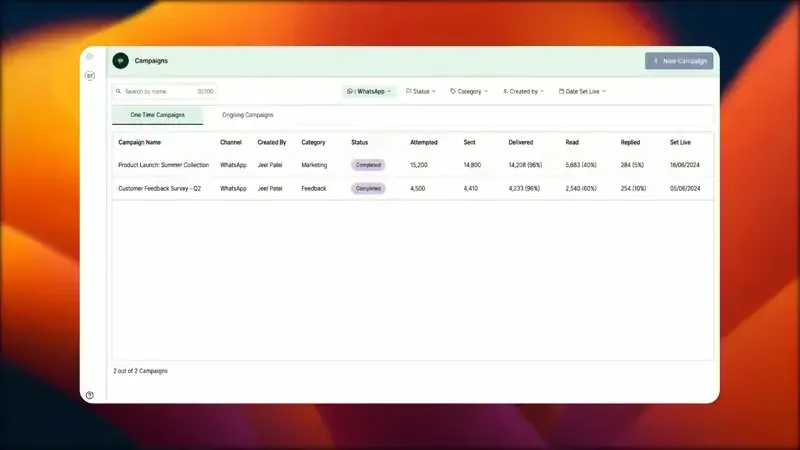
GrowOnBot Campaigns & Automations: Manage Shopify customer segments, abandoned carts, and multi-agent conversations with 0% markup.
Frequently Asked Questions: Shopify WhatsApp Marketing
Shopify D2C & AEOPractical answers to the most critical technical and operational questions for Shopify store owners.
Research Sources & Industry Citations
- 1. Baymard Institute: 49 E-Commerce Cart Abandonment Rate Statistics (70.19% average mobile checkout abandonment rate).
- 2. Shopify: The Future of Commerce & Global E-Commerce Trends Report (Mobile commerce traffic and checkout conversion data).
- 3. Meta Business Platform: Official WhatsApp Business API Documentation on Category Rate Cards (Utility vs Marketing conversation pricing).
- 4. Shiprocket: State of Indian E-Commerce & D2C Logistics (Cash on Delivery return-to-origin loss benchmarks).
Explore Related WhatsApp Business Guides
Master WhatsApp marketing, customer support, and sales automation with our comprehensive guides:
Supercharge Your Shopify Store
Turn Abandoned Carts into Recovered Revenue Today
Start your 14-day free trial on GrowOnBot today. Connect your Shopify store, activate automated cart recovery and COD verification, and pay official Meta rates with 0% platform markup.